Student Listing - Edit a Student Page
Add Navigation Link for Editing a Student to Student Details Page
Before we create our editstudent.php script, let's first add a navigation link for editing a student to our Student Details page studentdetails.php script. Open up the studentdetails.php script and add the following horizontal line and navigation link just below the closing table tag </table> line:
studentdetails.php - Student Detials: Add Navigation Link to editstudent.php
| ...
</table>
<hr/>
<p>If you would like to change any of the details of this student,feel free to
<a href='editstudent.php?id_to_edit=<?=$row['id']?>'> edit it</a></p>
<?php
else:
?>
<h3>No Student Details :-(</h3>
...
|
Creating a Edit a Student Page with the Usual Bootstrap Template with a Card
Let's create a editstudent.php script using a Bootstrap template and add a Card for our content with a header for the title of the page:
editstudent.php - Edit Student: using Bootstrap Template with Card
 1
 2
 3
 4
 5
 6
 7
 8
 9
10
11
12
13
14
15
16
17
18
19
20
21
22
23
24
25 | <html>
<head>
<link rel="stylesheet"
href="https://stackpath.bootstrapcdn.com/bootstrap/4.2.1/css/bootstrap.min.css"
integrity="sha384-GJzZqFGwb1QTTN6wy59ffF1BuGJpLSa9DkKMp0DgiMDm4iYMj70gZWKYbI706tWS"
crossorigin="anonymous">
<title>Edit Student</title>
</head>
<body>
<div class="card">
<div class="card-body">
<h1>Edit a Student</h1>
</div>
</div>
<script src="https://code.jquery.com/jquery-3.3.1.slim.min.js"
integrity="sha384-q8i/X+965DzO0rT7abK41JStQIAqVgRVzpbzo5smXKp4YfRvH+8abtTE1Pi6jizo"
crossorigin="anonymous"></script>
<script src="https://cdnjs.cloudflare.com/ajax/libs/popper.js/1.14.6/umd/popper.min.js"
integrity="sha384-wHAiFfRlMFy6i5SRaxvfOCifBUQy1xHdJ/yoi7FRNXMRBu5WHdZYu1hA6ZOblgut"
crossorigin="anonymous"></script>
<script src="https://stackpath.bootstrapcdn.com/bootstrap/4.2.1/js/bootstrap.min.js"
integrity="sha384-B0UglyR+jN6CkvvICOB2joaf5I4l3gm9GU6Hc1og6Ls7i6U/mkkaduKaBhlAXv9k"
crossorigin="anonymous"></script>
</body>
</html>
|
Connect to the Student Database
We'll need to access the Student database for the student we want to edit:
editstudent.php - Edit Student: Connect to the Database
| <body>
<div class="card">
<div class="card-body">
<h1>Edit a Student</h1>
<?php
require_once('dbconnection.php');
$dbc = mysqli_connect(DB_HOST, DB_USER, DB_PASSWORD, DB_NAME)
or trigger_error('Error connecting to MySQL server for DB_NAME.',
E_USER_ERROR);
|
Multiple Ways to Navigate to Edit a Student Page
There are two expected ways and various unanticipated ways to navigate to the editstudent.php script.
The first expected way is for the user to select the edit it link on the Student Details page. Doing so sends a single query parameter contained in the id_to_edit element of the $_GET super global variable.
The second expected way is when the user selects Update Student. When the user successfully enters the required data in the form fields and submits the form, we will want to update the data for this student in the studentListing table of the Student database. You can find the submitted form fields in the $_POST super global variable.
All other mechanisms are unanticipated. So this essentially gives us three choices we are looking for. Therefore, the best way to deal with these three choices is to create an if/elseif/else block of code structure:
editstudent.php - Edit Student: Conditions for Navigating to this Page
1
2
3
4
5
6
7
8
9
10
11
12
13
14
15
16
17
18 | $dbc = mysqli_connect(DB_HOST, DB_USER, DB_PASSWORD, DB_NAME)
or trigger_error('Error connecting to MySQL server for DB_NAME.',
E_USER_ERROR);
if (isset($_GET['id_to_edit']))
{
...
}
elseif (isset($_POST['edit_student_submission'], $_POST['student_first_name'],
$_POST['student_last_name'], $_POST['student_email']))
{
...
}
else // Unintended page link
{
...
}
?>
|
Direct Navigation from Student Details
The first intended way we will navigate to the editstudent.php script is when the user selects the edit it link on the studentdetails.php page. The link causes an HTTP GET to be sent to the editstudent.php script with the query parameter in the $_GET superglobal variable. We deal with this in the first if block:
| if (isset($_GET['id_to_edit']))
{
|
They should be presented with a page like this:
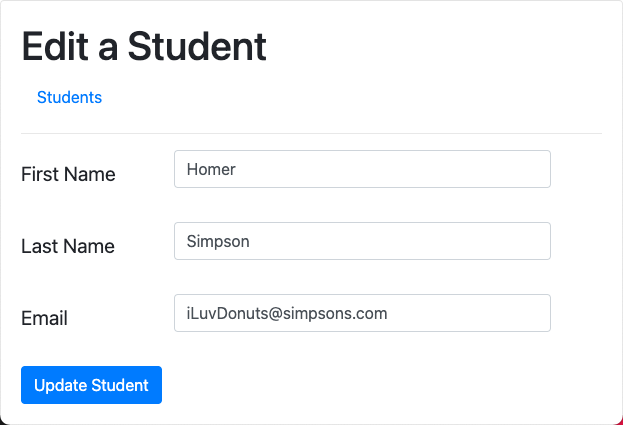
In the form above, notice that the fields are pre-populated with the student details. We do this by querying the studentListing table for the student details before displaying the form.
Inside the if block, query the studentListing table for the student detials we want to edit using the id_to_edit query parameter by adding the following code:
editstudent.php - Edit Student: direct navigation to this Page from Student Details
1
2
3
4
5
6
7
8
9
10
11
12
13
14
15
16
17
18
19 | if (isset($_GET['id_to_edit']))
{
$id_to_edit = $_GET['id_to_edit'];
$query = "SELECT * FROM studentListing WHERE id = $id_to_edit";
$result = mysqli_query($dbc, $query)
or trigger_error('Error querying database studentListing',
E_USER_ERROR);
if (mysqli_num_rows($result) == 1)
{
$row = mysqli_fetch_assoc($result);
$student_first_name = $row['first_name'];
$student_last_name = $row['last_name'];
$student_email = $row['email'];
}
}
|
Before working on the other conditions, let's add the form to update the student below all the conditional logic:
 1
 2
 3
 4
 5
 6
 7
 8
 9
10
11
12
13
14
15
16
17
18
19
20
21
22
23
24
25
26
27
28
29
30
31
32
33
34
35
36
37
38
39
40
41
42
43
44
45
46
47
48
49 | else // Unintended page link - No student to edit, link back to index
{
header("Location: index.php");
}
?>
<form class="needs-validation" novalidate method="POST"
action="<?= $_SERVER['PHP_SELF'] ?>">
<div class="form-group row">
<label for="student_first_name"
class="col-sm-3 col-form-label-lg">First Name</label>
<div class="col-sm-8">
<input type="text" class="form-control" id="student_first_name"
name="student_first_name" value= '<?=$student_first_name?>'
placeholder="First Name" required>
<div class="invalid-feedback">
Please provide a valid first name.
</div>
</div>
</div>
<div class="form-group row">
<label for="student_last_name"
class="col-sm-3 col-form-label-lg">Last Name</label>
<div class="col-sm-8">
<input type="text" class="form-control" id="student_last_name"
name="student_last_name" value= '<?=$student_last_name?>'
placeholder="Last Name" required>
<div class="invalid-feedback">
Please provide a valid last name.
</div>
</div>
</div>
<div class="form-group row">
<label for="student_email"
class="col-sm-3 col-form-label-lg">Email</label>
<div class="col-sm-8">
<input type="email" class="form-control"
id="student_email"
name="student_email"
value= '<?=$student_email?>'
placeholder="Email" required>
<div class="invalid-feedback">
Please provide a valid email address.
</div>
</div>
</div>
<button class="btn btn-primary" type="submit"
name="edit_student_submission">Update Student</button>
<input type="hidden" name="id_to_update" value="<?= $id_to_edit ?>">
</form>
|
Notice above that the fields have been made "sticky".
Also notice above the hidden <input> element witht the name attribute set to id_to_update so we know which ID to update in the database.
Finally, also notice we are using Bootstrap's client side validation, so add the following JavaScript below the form:
 1
 2
 3
 4
 5
 6
 7
 8
 9
10
11
12
13
14
15
16
17
18
19
20
21 | </form>
<script>
// JavaScript for disabling form submissions if there are invalid fields
(function() {
'use strict';
window.addEventListener('load', function() {
// Fetch all the forms we want to apply custom Bootstrap validation styles to
var forms = document.getElementsByClassName('needs-validation');
// Loop over them and prevent submission
var validation = Array.prototype.filter.call(forms, function(form) {
form.addEventListener('submit', function(event) {
if (form.checkValidity() === false) {
event.preventDefault();
event.stopPropagation();
}
form.classList.add('was-validated');
}, false);
});
}, false);
})();
</script>
|
This is the second intended way we will navigate to the editstudent.php page. Therefore we will be dealing with the elseif block:
| elseif (isset($_POST['edit_student_submission'],
$_POST['student_first_name'], $_POST['student_last_name'],
$_POST['student_email'], $_POST['id_to_update']))
{
|
We're in this condition as a result of the user selecting the Update Student submit button.
Because the web is stateless, we needed to carry over the student id we received from the previous navigation to the editstudent.php script (which we received as a query parameter from the $_GET[] superglobal). We took that parameter and assigned it to a variable called $id_to_edit in the last HTTP transaction and assigning it to a hidden variable in the form which we can now access in the $_POST[] superglobal:
| <input type="hidden" name="id_to_update" value="<?= $id_to_edit ?>">
|
Update the Student Details in the Database
In this elesif condition, we will update the student details in the studentListing table of the Student database. Add the following code within the elseif block:
 1
 2
 3
 4
 5
 6
 7
 8
 9
10
11
12
13
14
15
16
17
18
19
20
21
22 | elseif (isset($_POST['edit_student_submission'],
$_POST['student_first_name'], $_POST['student_last_name'],
$_POST['student_email'], $_POST['id_to_update']))
{
$student_first_name = $_POST['student_first_name'];
$student_last_name = $_POST['student_last_name'];
$student_email = $_POST['student_email'];
$id_to_update = $_POST['id_to_update'];
$query = "UPDATE studentListing SET first_name = '$student_first_name', "
. " last_name = '$student_last_name', email = '$student_email' "
. "WHERE id = $id_to_update";
mysqli_query($dbc, $query)
or trigger_error(
'Error querying database studentListing: Failed to update student listing',
E_USER_ERROR);
$nav_link = 'studentdetails.php?id=' . $id_to_update;
header("Location: $nav_link");
}
|
Notice when we are done updating the database, we link back to the Student Details page.
Unanticipated Navigation Methods
As before, since the HTTP request is coming from the client. In theory, unanticipated or malicious parameters can be in the query string (or even field parameters from the HTTP POST). Therefore, all other conditions we could navigate to the editstudent.php page are unintended, and we will be dealing with the else block:
| else // Unintended page link
{
|
In this case, we just want to link back to the main Student Listing main index.php page:
| else // Unintended page link - No student to edit, link back to index
{
header("Location: index.php");
}
|
Complete Code Listing
editstudent.php - Edit Student: Complete Code Listing
1
2
3
4
5
6
7
8
9
10
11
12
13
14
15
16
17
18
19
20
21
22
23
24
25
26
27
28
29
30
31
32
33
34
35
36
37
38
39
40
41
42
43
44
45
46
47
48
49
50
51
52
53
54
55
56
57
58
59
60
61
62
63
64
65
66
67
68
69
70
71
72
73
74
75
76
77
78
79
80
81
82
83
84
85
86
87
88
89
90
91
92
93
94
95
96
97
98
99
100
101
102
103
104
105
106
107
108
109
110
111
112
113
114
115
116
117
118
119
120
121
122
123
124
125
126
127
128
129
130
131
132
133
134
135
136
137
138
139
140
141
142
143
144
145
146 | <!DOCTYPE html>
<html>
<head>
<title>Edit Student</title>
<link rel="stylesheet"
href="https://stackpath.bootstrapcdn.com/bootstrap/4.2.1/css/bootstrap.min.css"
integrity="sha384-GJzZqFGwb1QTTN6wy59ffF1BuGJpLSa9DkKMp0DgiMDm4iYMj70gZWKYbI706tWS"
crossorigin="anonymous">
</head>
<body>
<div class="card">
<div class="card-body">
<h1>Edit a Student</h1>
<nav class="nav">
<a class="nav-link" href="index.php">Students</a>
</nav>
<hr/>
<?php
require_once('dbconnection.php');
$dbc = mysqli_connect(DB_HOST, DB_USER, DB_PASSWORD, DB_NAME)
or trigger_error('Error connecting to MySQL server for DB_NAME.',
E_USER_ERROR);
if (isset($_GET['id_to_edit']))
{
$id_to_edit = $_GET['id_to_edit'];
$query = "SELECT * FROM studentListing WHERE id = $id_to_edit";
$result = mysqli_query($dbc, $query)
or trigger_error('Error querying database studentListing',
E_USER_ERROR);
if (mysqli_num_rows($result) == 1)
{
$row = mysqli_fetch_assoc($result);
$student_first_name = $row['first_name'];
$student_last_name = $row['last_name'];
$student_email = $row['email'];
}
}
elseif (isset($_POST['edit_student_submission'], $_POST['student_first_name'],
$_POST['student_last_name'], $_POST['student_email']))
{
$student_first_name = $_POST['student_first_name'];
$student_last_name = $_POST['student_last_name'];
$student_email = $_POST['student_email'];
$id_to_update = $_POST['id_to_update'];
$query = "UPDATE studentListing SET first_name = '$student_first_name', "
. " last_name = '$student_last_name', email = '$student_email' "
. "WHERE id = $id_to_update";
mysqli_query($dbc, $query)
or trigger_error(
'Error querying database studentListing: Failed to update student listing',
E_USER_ERROR);
$nav_link = 'studentdetails.php?id=' . $id_to_update;
header("Location: $nav_link");
}
else // Unintended page link
{
header("Location: index.php");
}
?>
<form class="needs-validation" novalidate method="POST"
action="<?= $_SERVER['PHP_SELF'] ?>">
<div class="form-group row">
<label for="student_first_name"
class="col-sm-3 col-form-label-lg">First Name</label>
<div class="col-sm-8">
<input type="text" class="form-control" id="student_first_name"
name="student_first_name" value= '<?=$student_first_name?>'
placeholder="First Name" required>
<div class="invalid-feedback">
Please provide a valid first name.
</div>
</div>
</div>
<div class="form-group row">
<label for="student_last_name"
class="col-sm-3 col-form-label-lg">Last Name</label>
<div class="col-sm-8">
<input type="text" class="form-control" id="student_last_name"
name="student_last_name" value= '<?=$student_last_name?>'
placeholder="Last Name" required>
<div class="invalid-feedback">
Please provide a valid last name.
</div>
</div>
</div>
<div class="form-group row">
<label for="student_email"
class="col-sm-3 col-form-label-lg">Email</label>
<div class="col-sm-8">
<input type="email" class="form-control"
id="student_email"
name="student_email"
value= '<?=$student_email?>'
placeholder="Email" required>
<div class="invalid-feedback">
Please provide a valid email address.
</div>
</div>
</div>
<button class="btn btn-primary" type="submit"
name="edit_student_submission">Update Student</button>
<input type="hidden" name="id_to_update" value="<?= $id_to_edit ?>">
</form>
<script>
// JavaScript for disabling form submissions if there are invalid fields
(function() {
  'use strict';
  window.addEventListener('load', function() {
    // Fetch all the forms we want to apply custom Bootstrap validation styles to
    var forms = document.getElementsByClassName('needs-validation');
    // Loop over them and prevent submission
    var validation = Array.prototype.filter.call(forms, function(form) {
      form.addEventListener('submit', function(event) {
        if (form.checkValidity() === false) {
          event.preventDefault();
          event.stopPropagation();
        }
        form.classList.add('was-validated');
      }, false);
    });
  }, false);
})();
</script>
</div>
</div>
<script src="https://code.jquery.com/jquery-3.3.1.slim.min.js"
integrity="sha384-q8i/X+965DzO0rT7abK41JStQIAqVgRVzpbzo5smXKp4YfRvH+8abtTE1Pi6jizo"
crossorigin="anonymous"></script>
<script src="https://cdnjs.cloudflare.com/ajax/libs/popper.js/1.14.6/umd/popper.min.js"
integrity="sha384-wHAiFfRlMFy6i5SRaxvfOCifBUQy1xHdJ/yoi7FRNXMRBu5WHdZYu1hA6ZOblgut"
crossorigin="anonymous"></script>
<script src="https://stackpath.bootstrapcdn.com/bootstrap/4.2.1/js/bootstrap.min.js"
integrity="sha384-B0UglyR+jN6CkvvICOB2joaf5I4l3gm9GU6Hc1og6Ls7i6U/mkkaduKaBhlAXv9k"
crossorigin="anonymous"></script>
</body>
</html>
|