Lecture Notes - Week 5
Readings
- Chapters:
- 15 - Displaying a List of Item Details
Screencast - Week 5
Outline of Topics
-
Simple Application to List Student Details
-
Designing the Database
-
Creating the Database
-
Adding some Data
-
Create a Main Page for Displaying a List of Items
-
GETvs.POST -
Create a Details Page
-
Super Global
$_GET[]
Lecture
Simple Application to List Student Details
Let's say we want to create a simple application to display a list of students and their details. We'd like the main page to look like this:

And when we select a student, we want to see a details page that looks like this:
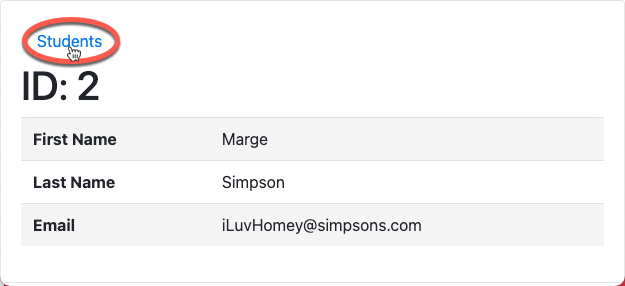
Notice we have a link to navigate back to the main students listing page.
Designing the Database
- Let's start with the data we need first:
- first name
- last name
- email address
Let's create a single table to hold our student data and call it studentListing and store it in a database called Student.
In our studentListing table we'll need the following fields:
idfor the primary keyfirst_namelast_nameemail
Creating the Database
-
Let's use Adminer to create the
Studentdatabase: -
Now let create the
studentListingtable with the following fields:-
For the
idfield:- Enter
idunder Column name - Keep the Type as int
- Select the
AIradio button for auto incrementBy naming a field id and making it auto-incrementing, Adminer will set this field to be the primary key for this table
- Enter
-
For the
first_namefield:- Enter
first_nameunder Column name - Keep the Type as varchar
- Enter 25 for the length
- Enter
-
For the
last_namefield:- Enter
last_nameunder Column name - Keep the Type as varchar
- Enter 25 for the length
- Enter
-
For the
emailfield:- Enter
emailunder Column name - Keep the Type as varchar
- Enter 50 for the length
- Enter
-
Here is the a screenshot of the Student database in Adminer:
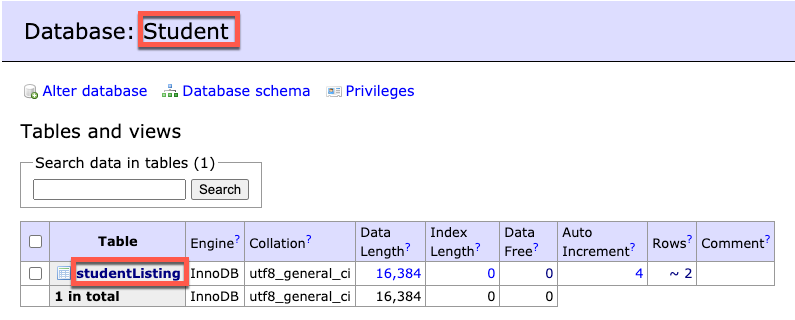
And here is a screenshot of the studentListing table:

Adding some Data
Let's use Adminer to add some data to our studentListing table:
-
Add the following 3 student entries:
-
Homer Simpson
- first_name:
Homer - last_name:
Simpson - email:
iLuvDonuts@simpsons.com
- first_name:
-
Marge Simpson
- first_name:
Marge - last_name:
Simpson - email:
iLuvHomey@simpsons.com
- first_name:
-
Bart Simpson
- first_name:
Bart - last_name:
Simpson - email:
kowaBungaDude@simpsons.com
- first_name:
-
Here is what the studentListing table should look like after adding this data:

Create a Main Page for Displaying a List of Items
First, let's create our main Student Listing script and call it index.php.
GET vs. POST
POSTis typically used in forms and is intended to change the state on the server
1 | |
GETcan be sent from a form (set themethodattribute to GET)
1 | |
GETcan also be sent as a URL (which is how we're using it in this example)
1 2 | |
Create a Details Page
Getting back to our Student Listing application, let's create that studentdetails.php script to display the details of the student we selected from the main page.
Super Global $_GET[]
-
Similiar to
$_POST[],$_GET[]is a super global array variable that holds either form data when sent from a form, or data embedded in a URL -
When sending a
GETrequest from a form, the data is automatically sent and accessed using the name attributes as indexed keys into the array -
When embedded as query parameters in a URL, the data is built as key-value pairs as part of the URL. Each value in the array is indexed using the key as mentioned earlier
-
multiple query parameters are separated by ampersands (
&)

Let's go back to our studentdetails.php script to see how we apply this.